Nexus Transit Authority: Operations Console Challenge
Terminal Nexus-9 moves travelers between worlds. Six portals hold six corridors open around the clock, and a traveler who steps into one arrives somewhere else entirely.
Corridors aren't reliable. Push enough traffic through one and its containment field starts to wander. Lose containment altogether and the corridor drops until the field cycles back up. None of this is visible from the concourse: a portal about to fail looks exactly like one that's fine.
The operator at the desk is the last check before someone steps through, and right now they're working blind. No live view of the network, no list of who's booked, no way to get a traveler onto the next departure.
That's the screen you're building.
You'll build an operations console: a web app that shows the live state of the portal network, lists a traveler's upcoming transits, and lets them book a new one. It talks over HTTP to a server we call the Control Tower, which serves all the data you'll render.
You have total freedom on implementation. Any framework, any styling approach, any state management, any build tooling, or none of it. The only hard requirement is that your app talks to the Control Tower's HTTP/JSON endpoints and runs from a single documented command.
Questions? Reach out to Dao ([email protected]).
0. Get your challenge repo before anything else
Go to https://fall26-challenge.generatenu.com/apply and enter your name and GitHub username. This
creates a private repo for you under our org and adds you as a collaborator
with push access.
This is the repo your submission must live in. Don't create your own repo instead. Work that doesn't end up in the repo created for you here isn't reviewed. If you lose the link, submit your username again; it's safe to repeat and just hands you back the same repo.
1. How this gets evaluated
Most of this isn't about whether you can build a dashboard. It's about the decisions around it: what the UI does when a value is missing, when a request fails, and when nobody has told you what the screen should look like.
The two parts test opposite skills on purpose.
Part 1 gives you a design. We want to see execution: fidelity to a spec, correct data handling, and pagination done properly.
Part 2 gives you nothing but an API. We want to see judgment: how you structure a flow nobody described to you, and what you do when a request fails.
Part 2 is smaller than Part 1, and weighted at least as heavily.
We read DESIGN.md as closely as the code. Two people can build the same
screen and have made completely different decisions getting there, and the
decisions are the part we can't see from the repo alone.
2. The problem
The six portals are Central Hub Alpha, Northern Gateway, Quantum Nexus, Eastern Node, Southern Passage, and Western Bridge. Each is always in exactly one of three states.
Nominal. Carrying traffic, containment steady, safe to walk through.
Unstable. Still open and still passing travelers, but close enough to its containment ceiling that it might not stay that way. It hasn't failed. It's telling you it might.
Offline. Containment has dropped. Nothing goes through until the field cycles back up, and a portal not holding a corridor reports no load at all.
The network shifts on its own, hour by hour. Travelers hold reservations booked weeks out: some cleared, some queued behind an unstable corridor, some held outright. New departures open continuously.
Roughly one booking in three fails. The console is the only thing that decides whether the traveler in front of you finds out.
3. Talking to the Control Tower
Base URL: https://fall26-challenge.generatenu.com
No authentication. None of the endpoints in this challenge need a token
or a login. Ignore the /register and /login endpoints you'll see in the
API reference; those belong to the backend challenge.
Interactive API reference: https://fall26-challenge.generatenu.com/docs
Machine-readable spec: https://fall26-challenge.generatenu.com/openapi.json
The OpenAPI spec is generated from the server's own types, so it is always accurate. You're welcome to generate a typed client from it rather than hand-writing one.
A note on CORS
If you run a dev server on its own port, the browser will block these
requests even though curl works fine. Configure a dev proxy or handle it
however you prefer; how you solve it isn't part of what we're evaluating.
4. Part 1: the operations dashboard
Build the dashboard in this Figma file: Frontend Challenge: Operations Console
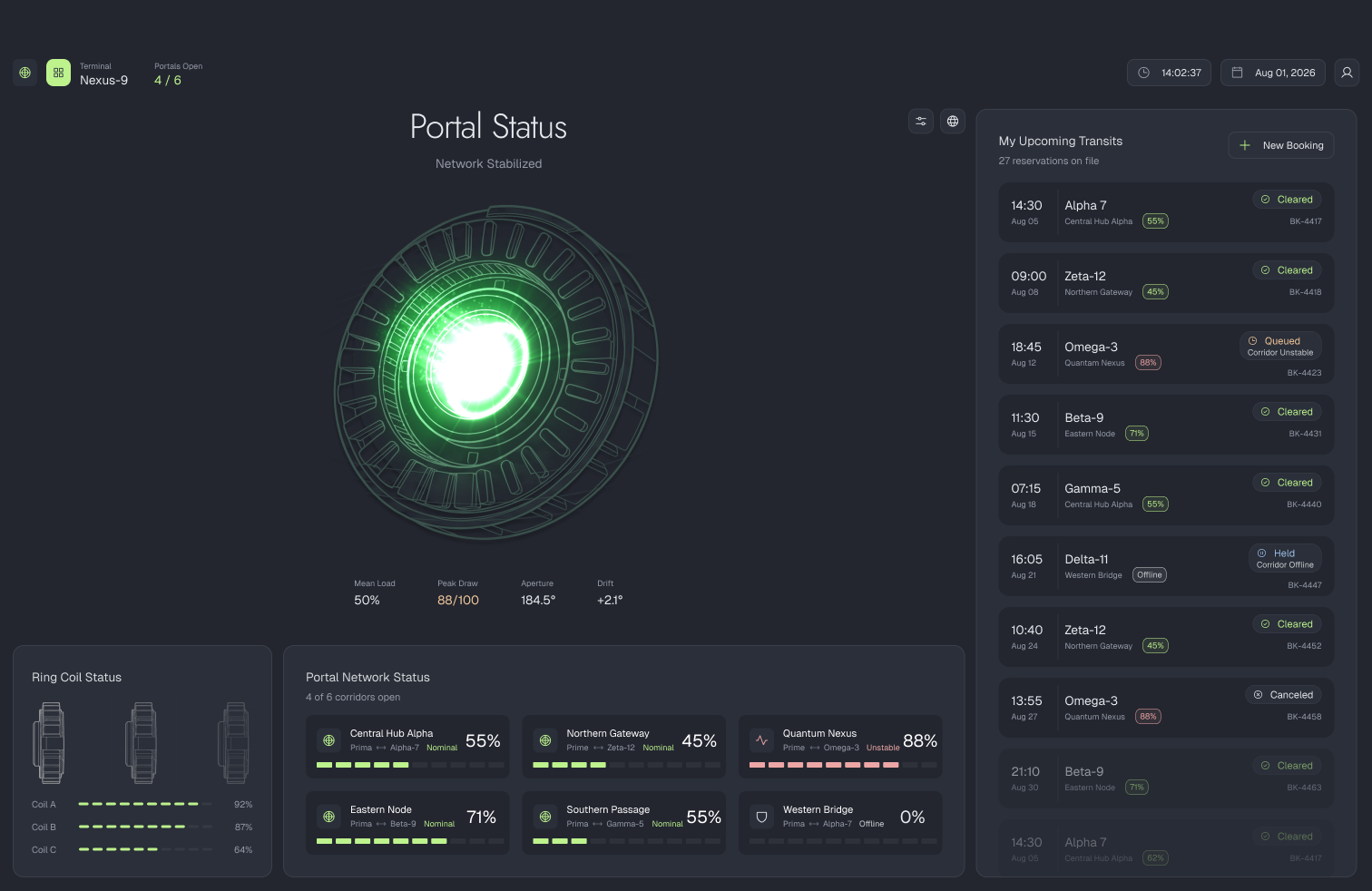
Match the design. Where it's ambiguous or doesn't cover a state you hit,
use your judgment and say so in DESIGN.md. We're not measuring pixels,
but every state the design shows should exist in what you build.
The Figma file is the source of truth for spacing, color and type; the images here just show which panel each endpoint feeds.
Portal Network Status
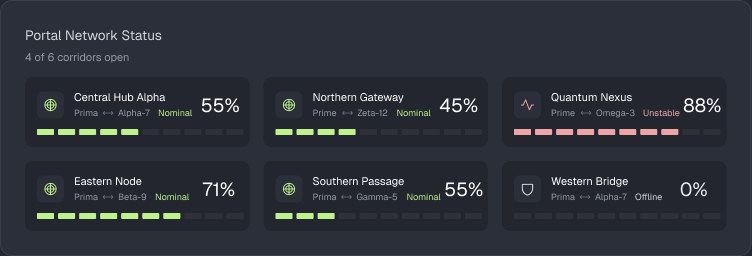
GET /frontend/portals
Returns all six portals:
[
  { "name": "Central Hub Alpha", "status": "nominal",  "load": 55 },
  { "name": "Quantum Nexus",     "status": "unstable", "load": 88 },
  { "name": "Western Bridge",    "status": "offline",  "load": 0 }
]
statusis one ofnominal,unstable,offline. It is derived from the portal's load and containment field. You never have to compute it, but you do have to render all three distinctly.loadis a percentage between0and100. A portal can reportload: 0while itsstatusisnominal: that's a healthy corridor with nothing currently going through it. Zero load doesn't mean offline, so branch onstatus.- The order of the array is fixed. Your layout should not reshuffle between polls.
- Network state changes once an hour. Polling more often than that returns identical data. Every hour is guaranteed to contain at least one portal in each state, so you will always have something to render for all three.
The 4 / 6 corridors open count in the design isn't something the API
returns. Work it out from the data.
My Upcoming Transits
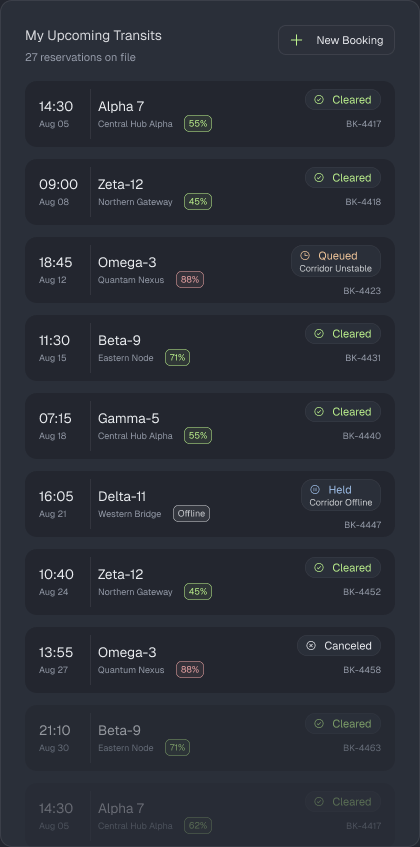
Note the fade at the bottom of the list in the design: there are far more reservations than fit on screen.
GET /frontend/bookings?limit=10&cursor=<opaque>
{
  "items": [
    {
      "reference": "BK-4417",
      "departsAt": "2026-08-14T07:15:00Z",
      "destination": "Alpha-7",
      "portal": "Meridian Crossing",
      "load": 36,
      "status": "cleared"
    },
    {
      "reference": "BK-4422",
      "departsAt": "2026-08-20T13:55:00Z",
      "destination": "Zeta-12",
      "portal": "Tidewater Arch",
      "load": null,
      "status": "held",
      "statusDetail": "Corridor Offline"
    }
  ],
  "nextCursor": "MjAyNi0wOC0xN1QwOTowMDowMFp8QkstNDQxOQ",
  "hasMore": true,
  "total": 46
}
statusis one ofcleared,queued,held,canceled.statusDetailis the secondary reason line and is absent when there isn't one.loadisnullwhen the corridor was offline and no reading was taken. That is different from a load of0.totalis every booking on file, not just this batch. The reservations count in the design comes from here.
Pagination is not optional. limit is capped at 10, and asking for
more returns 422. There are far more bookings on file than that, so the
list has to be fetched in batches.
Every response includes a nextCursor, which marks where that batch ended.
Send it back as the cursor query parameter to get the batch after it, and
keep going until hasMore comes back false, at which point nextCursor
is omitted entirely.
The cursor is opaque: it encodes a position in the list, and the only correct thing to do with it is send it back exactly as received. Don't try to construct or modify one.
The bookings list and the portal panel are independent data sets. Booking portal names are deliberately different from the six network portals, and a booking's
loadis a stored snapshot, not the live value. Don't spend time hunting for a correlation; there isn't one.
5. Part 2: the booking flow
Build a flow that lets a traveler book a transit.
We are deliberately not telling you what this looks like. How many
screens, in what order, what a booking form asks for, how a slot gets
picked, what happens after a confirmation: all of it is yours. There is no
mockup and no right answer. Design something you'd be willing to ship, and
explain your reasoning in DESIGN.md.
Available slots
GET /frontend/slots
[
  {
    "id": "SLOT-1000",
    "destination": "Alpha-7",
    "portal": "Meridian Crossing",
    "departsAt": "2026-08-13T06:00:00Z",
    "durationMinutes": 60,
    "seatsAvailable": 2,
    "fareCredits": 260
  }
]
The whole catalogue comes back in one request. There's no filtering or pagination. How a traveler narrows it down is a design decision, not an API call.
Submitting a booking
POST /frontend/slots/{slotId}/book
{
  "travelerName": "Ada Lovelace",
  "travelerCount": 2,
  "contactEmail": "[email protected]",
  "notes": "window seat if the corridor allows",
  "metadata": { "anything": "your form collects" }
}
Only travelerCount is structurally required. metadata is a free-form
key/value bag. If your booking form asks for something we didn't
anticipate, put it there. We're not prescribing what a booking form should
contain.
Every response has the same shape, whether it worked or not:
{
  "status": "confirmed",
  "slotId": "SLOT-1000",
  "detail": "booking confirmed",
  "retryable": false,

  "reference": "BK-68E204",
  "travelerCount": 2,
  "totalCredits": 520,
  "confirmedAt": "2026-08-12T03:48:23Z"
}
The last four fields are present only when status is confirmed.
status |
retryable |
HTTP | What it means |
|---|---|---|---|
confirmed |
false |
200 |
Booked. reference is the traveler's confirmation. |
slot_taken |
false |
200 |
Someone else got it. This slot is gone. |
insufficient_seats |
false |
200 |
Party is larger than seatsAvailable. |
corridor_unstable |
true |
503 |
The booking never completed. The same request is still valid. |
detail is human-readable and safe to show a traveler as-is.
An unknown slotId returns 404 with a different body. That's a bug in
your client, not an outcome.
This endpoint fails about 30% of the time, on purpose
That is the point of Part 2. You will hit it within a few minutes of testing, and a flow that only handles the happy path will visibly fall apart.
Handling it well means more than showing an error. What the traveler sees, what happens to what they've entered, and what they can do next are all decisions, and there's no single right answer to any of them.
What's simulated
So you don't build against guarantees that don't exist:
- Submissions are not persisted. A confirmed booking won't appear in
GET /frontend/bookings, and its reference won't resolve anywhere. - Inventory doesn't move. Booking a slot never decrements
seatsAvailable.slot_takenis simulated, not real contention.
Build as if these were real. We just don't want you debugging why a confirmed booking didn't show up in the list.
6. What to submit
Your whole submission (code, README.md, DESIGN.md, all of it)
must live in the repo you got from /apply in §0.
- A working console covering both parts, that runs from a single documented command.
README.md: setup and how to run it. Assume the reader has never seen your project before. Include a short screen recording of you clicking through both parts, so we can see the flow working without rebuilding your environment. A link is fine.DESIGN.md(max 2 pages): not a tour of every component, but the thinking behind it:- The flow you designed. What shape did Part 2 take, and why that one? What did you consider and rule out?
- Failure from the traveler's side. One booking in three fails. What do they see, and what can they do about it?
- What you left out, and why that was the right call here rather than an omission.
Accessibility, responsiveness, and empty/loading states aren't graded separately, but they're part of whether this reads as shippable.
7. If you're not sure where to start
- Get one endpoint rendering.
GET /frontend/portalsreturns six items and needs no auth or pagination. If you can render those six cards, your setup and CORS are solved. - Then do the bookings list. Pagination is the mechanical part of Part 1. Get the cursor loop terminating correctly before you style anything.
- Look at how the good ones do it. You've booked flights, hotels, event tickets, restaurant tables. Go back through a few of those flows and pay attention to how they sequence the steps, what they ask for and when they ask for it, and how they behave when something goes wrong. The products that feel effortless got there deliberately. Take the structure that works instead of inventing one from scratch.
- Build Part 2's flow with the happy path only, briefly. Just enough to submit successfully once.
- Then break it on purpose. Submit repeatedly until you've seen all four outcomes, and fix what falls over.
- Write
DESIGN.mdas you go, not at the end. It's easier to record your reasoning in the moment than to reconstruct it, and it reads more honestly for it.